HappyHorse 1.0: generate on Blinkvid today
HappyHorse 1.0 ships as a single model id: text, image, first/last frame, continuation, reference workflow, and clip edit (billing follows the selected mode). This page includes a live generator using the same credits and queue as the rest of Blinkvid.
Example: 5 seconds at 720P is about 20 credits (varies by mode and reference add-ons).
What is Happy Horse AI and why people are searching for it
Users are already searching for HappyHorse 1.0, Happy Horse 1.0, Happy Horse AI, and HappyHorse AI because the model is positioning itself around fast multimodal generation. The strongest early signals are expressive faces, speech-aligned motion, and a cleaner single-model architecture.
How HappyHorse 1.0 could fit Blinkvid
If the release lands cleanly, HappyHorse 1.0 could become a strong option for dialogue-led clips, reference-image-driven motion, and multilingual character scenes. Until then, this page works as a model brief and a place to save example setups.
Why HappyHorse 1.0 stands out early
What makes Happy Horse AI interesting as its own model line, separate from Seedance or Veo.
One model for text, video, and audio
HappyHorse 1.0 positions itself around a unified transformer design, which is part of why the model is getting attention as a simpler, faster stack.
Built around expressive human motion
The strongest early pitch is facial performance, natural body motion, and tighter speech coordination rather than generic motion alone.
Fast inference is part of the story
The model is being framed around unusually fast generation speed, which matters for teams that want to iterate on action-heavy scenes quickly.
Multilingual by design
Happy Horse AI is positioning around multiple supported languages, making it worth watching for global creator and marketing workflows.
Promising for reference-image scenes
The model architecture highlights reference-image conditioning, which makes it relevant for character-led shots where one still frame sets the look.
A useful model to pre-plan for
Keep reference images, action-led prompts, and target scenes ready so you can reuse them across text, image, or reference flows.
Why HappyHorse deserves its own landing page
Search intent is forming around HappyHorse as its own product, not as a Seedance variant. A dedicated page captures that intent, explains modes, and links cleanly to the same model id you pick elsewhere in Blinkvid.
How to prepare for HappyHorse 1.0 on Blinkvid
Start with a clean reference frame
Prepare a portrait or scene still with clear lighting and visible expression. That will matter if you want to guide the first motion pass from an image.
Write a motion-first prompt
Keep the action simple and visual. Focus on body movement, camera movement, and emotional expression instead of stacking too many style cues.
Save the setup and watch for launch
Use the examples on this page as a working brief so your first HappyHorse generation is ready the moment Blinkvid support opens.
Try generation from this page
The hero generator is wired to HappyHorse 1.0. You can also open the text, image, or reference tool pages and pick the same model id.
10 free credits for new accounts.
Frequently asked questions
Explore more AI tools
Ready to keep an eye on HappyHorse 1.0?
Sample outputs and first prompt setups
These clips show why HappyHorse 1.0, Happy Horse 1.0, HappyHorse AI, and Happy Horse AI are already pulling search demand. The third example keeps the exact prompt you provided and pairs it with a reference frame inspired by your uploaded image.
Early signal
The official HappyHorse sample output
Use the first-party clip to anchor the page around the exact model people are searching for, rather than a generic placeholder reel.
Prompt
Official launch sample from the HappyHorse project site.
Human performance
A clip that highlights coordinated speaking motion
This sample helps position Happy Horse AI around speech-aligned action and expressive human performance instead of abstract motion only.
Prompt
Third-party benchmark sample showcasing speaking performance and motion coherence.
First saved setup
Your first saved HappyHorse template
This example uses the supplied action prompt and a reference frame based on your uploaded image so the landing page already has a realistic first-use template ready.
Reference frame
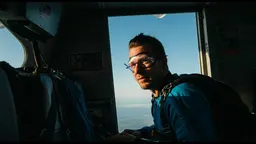
Prompt
The man smiles and jumps out the plane. The camera tracks with him as he goes into freefall.
 Blinkvid